
Music Assistant for Home Assistant
After recent success getting Home Assistant set up and linked to various bits of tech around the narrowboat, I’ve been working on the Music Assistant side of things. I’ve got a huge collection of MP3s taken from CDs from when I used to be a professional DJ, an Apple Music subscription and a Soundcloud with years of ‘liked’ songs that aren’t available elsewhere. I bloody love music and listen to it all day while working.
Here’s how I got all this set up.
Hardware
The MP3 library is on an external drive attached to my Mac Mini, which is attached to the router with a network cable. Home Assistant is on a Rasberry Pi 4b with an SSD drive, and also attached to the router with a network cable. An old Sonos Play:1 speaker is connected via wifi and sounds fantastic. I’ve already got Jellyfin media server running on the Mac for viewing other media files, so that was the first option.
Jellyfin Media Server
Jellyfin is a ‘fork’ of Plex media server, a system that can turn your computer into a media hub that can be accessed from smart TVs, iPads etc. Plex is a complete pain in the arse demanding logins even for a local connection. That and annoying commercialisation made me distrust them so I tried Emby, got annoyed with that and moved to Jellyfin instead. It was working great for video files so far.
Trying to import my MP3 library failed horribly however. Identifying music files relies on ‘ID3 tags’ within the files as well as the file names and folder structure. This isn’t easy as my collection spans 20+ years and the filenames and tags aren’t 100%. Jellyfin failed to import files with ‘[‘ in the names or tags, just getting stuck without any error messages to let me know what was going on. I wasn’t going to go through all the files to try and find what might be blocking the import so gave up on using Jellyfin for the music collection.
Jellyfin is an awesome, free media server and I really appreciate all the time and effort that goes into developing it. Some kind of feedback on why files won’t import would be really useful though, and skipping any awkward files rather than the whole import just getting stuck would help too.
Subsonic
While this looked like a great option, there were some issues with it that made Subsonic a non-starter.
- The ancient interface is confusing and unpleasant to use
- Subsonic wouldn’t update after any changes to the music library – it had to be removed and re-added. Not a massive issue as it scans the library quickly, but still annoying
- The issue that killed off using this however was that album artists were coming through to Music Assistant wrong. That makes it useless, so I uninstalled it.
Filesystem (remote share)
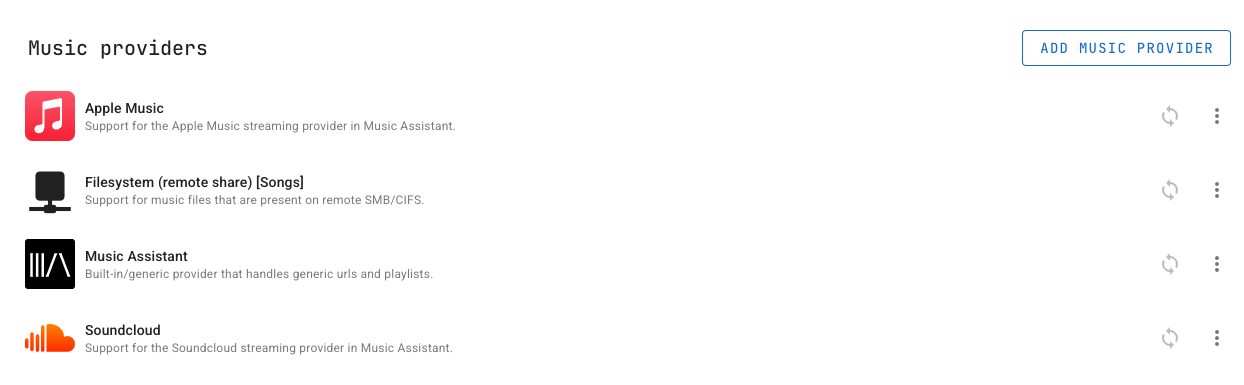
After getting deflated that Jellyfin and Subsonic didn’t work, I noticed there was an option for ‘Filesystem (remote share)’ in Music Assistant’s ‘Music Providers’. After some tweaking the network settings on the Mac Mini, Music Assistant was able to access the files directly without needing a separate media server app to be running on the Mac. The Mac is set to a static IP address in its network settings and the library scanned quickly. Success!
Soundcloud
Soundcloud integration is built in to Music Assistant too, and just needed some strings of data copying out of the ‘developer tools’ panel of the web browser while logged in to Soundcloud. Sneaky way of doing things and didn’t need me to verify account details with an OAuth popup.
Apple Music
Apple Music integration is built in to Music Asisstant and connecting was similar to Soundcloud – logging in to a web browser and copying a string of data out of the ‘developer tools’ panel to get connected.
Last.fm scrobbling
I used to use this a lot back in the day and have 85k ‘scrobbles’ on my account, but stopped using it for some reason. Scrobbling adds each play of a track to your library and then Last.fm can suggest artists you like. I’ve discovered so many new artists this way!
It was a nice surprise to see it’s still alive so I linked it to Music Assistant using an easy to set up API key. Their website terminology is slightly confusing in naming it an ‘API account’ as it’s just some API keys under my Last.fm account.
The link is and there’s no need to enter a website address etc. to use with Music Assistant.
Thoughts
Fixing all my ID3 tags might be possible using something like the MusicBrainz Picard app and I’ll be experimenting with that.
Abandoned software: Subsonic and other similar media servers haven’t been updated for years and that’s a real shame. I imagine streaming services like Apple Music and Spotify have taken over from this kind of thing.
It’s not for everyone: After hours of setup of Home Assistant plus banging my head against Jellyfin and Subsonic, I can see why a lot of people would just pay a tenner a month to Spotify et al and get on with their lives.
Support routes: Only having a social media account or Discord for support is an absolutely terrible idea and needs to stop. It’s the absolute worst way to collection information together, means opening Discord and joining the server and relies on a profit focused company that could close it down at any time. Please use publicly accessible forums or decent FAQ pages, developers!
On the whole, getting Music Assistant up and running has been fairly straightforward and I can now use an old Sonos speaker as an Airplay device to play all my music collections from one place. Home Assistant is such a great system allowing tech and services from various manufacturers to be linked together. Marvellous!