DespairPlay GUI - Linux Airplay app
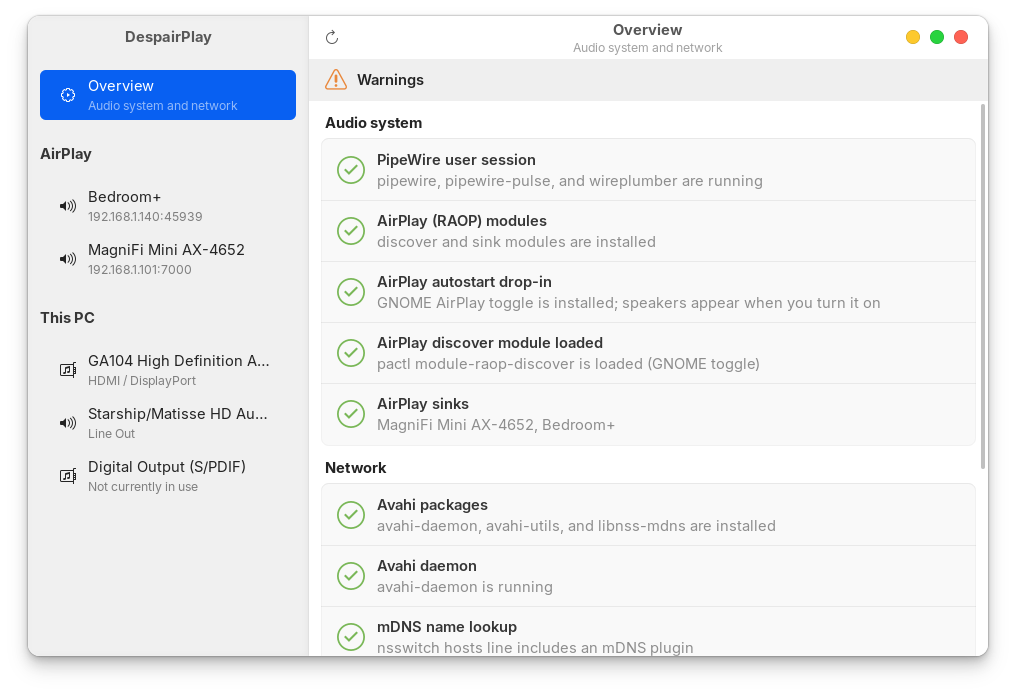
I've vibe coded DespairPlay GUI - a GTK4 / libadwaita app that inspects the Linux AirPlay sender stack (Avahi, PipeWire RAOP, firewall/mDNS) and shows which parts of this confusing house of cards are installed and active. Yes I could check it via terminal but I forget the ridiculous commands like "raop - v do-thing-pls -c -f", as I don't need to check it often.
Linux can send audio to AirPlay speakers via RAOP (AirPlay 1) but it's a confusing mess. This app diagnoses potential issues instead of just shrugging and recommending “install more packages”. I spaffed this project out after sliding into despair tryng to understand why my soundbar stopped playing music one day.
It does not implement an AirPlay receiver, screen mirroring, or AirPlay 2 sending.
Github & Packaging
It was developed on Ubuntu 24 with Cursor, and uses libraries included with Ubuntu. The packaged version installed and worked fine on my ZorinOS laptop too.
Code is on Github and the packaging/release is WIP. The Github Action creates a zip that can be downloaded, unzipped and installed (example)
To-dos include a proper release with versioned .deb file attached.
System Tray Airplay Toggle
DespairPlay GUI also checks the status of this Gnome extension that adds an Airplay speaker toggle to the system tray - bear in mind 'Gnome tweaks' can mess with this though. The Ubuntu version of Gnome really is a bin fire.
https://github.com/craw0967/pipewire-airplay-toggle
Disclaimer
I am a web designer/developer so Linux desktop app development is new to me. It seems to work OK on my PC and laptop but is offered with no warranty, or even confidence it will work on your PC. Feel free to add a Github issue if you've got any constructive feedback or improvements to suggest.