
Home Assistant and ESPHome on a narrowboat using a Raspberry Pi
I live and work on my 50′ narrowboat Thin Lizzy, and have been monitoring water leaks (thankfully none!) and air quality recently using Aqara sensors and hub. The multifuel stove and cooking absolutely trash the air quality aboard and poor air can be very bad for our health.
After setting that up I hated having to use the Aqara app or Apple Home which is all proprietary and seemed very basic. I used a RPi as a ‘PiHole’ ad blocking device in my old flat, so installed Home Assistant as my brother and a friend had been talking about it.
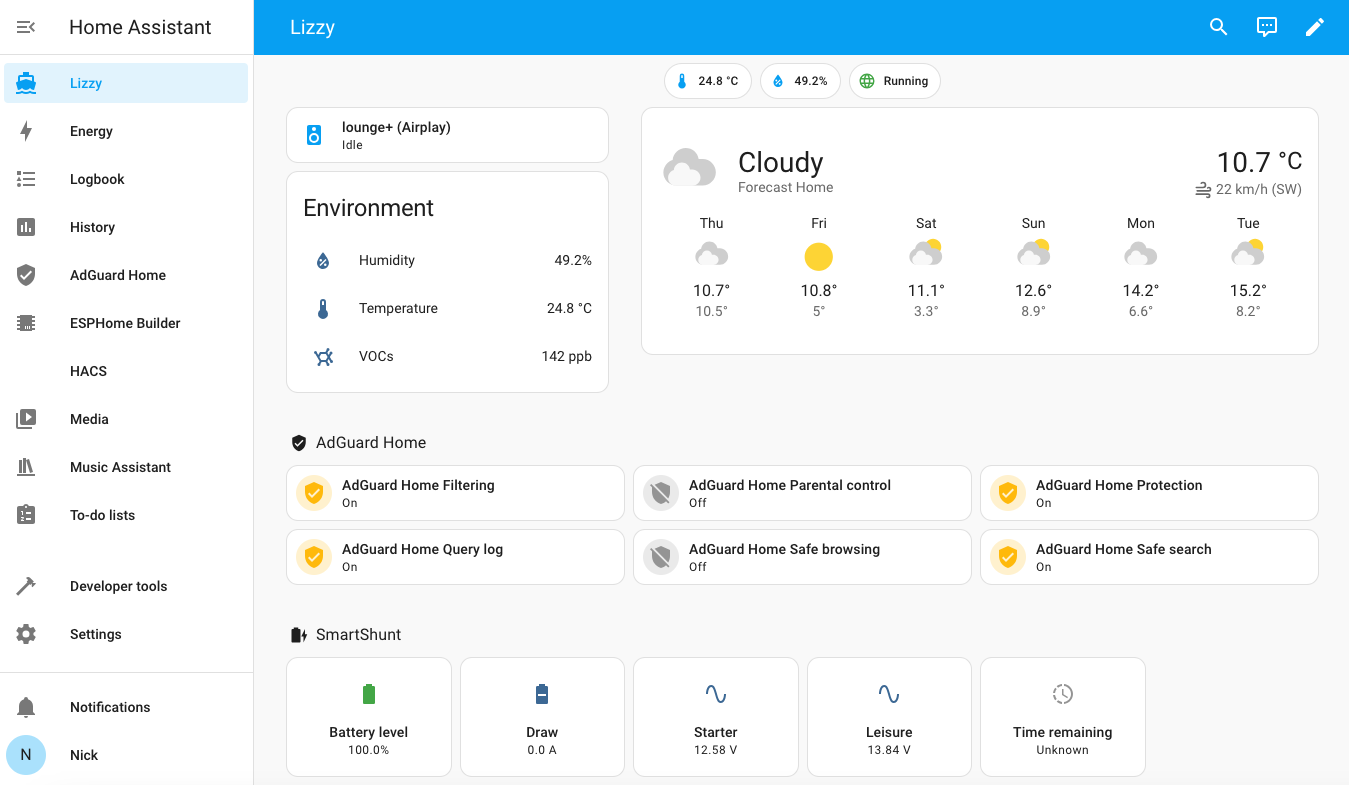
Having recently rewiring the whole engine bay and added a Victron Smart Shunt it would be nice to monitor that, and when I have the inverter & solar fitted later this year being able to see the whole system at a glance without having to buy a Cerbo/screen etc would be excellent. I got thinking about automatic air quality control with humidity and TVOC/PM2.5 sensors linked to air purifier(s) and extractor fans.
Hardware
- Raspberry Pi 4, 2gb
- Started off with an 8gb SD card, but filled that up in a few days
- Now running 240gb Crucial SSD with USB 3 adapter from PiHut (cheapo ones don’t work apparently..)
- Home Assistant Connect ZBT-1 Zigbee dongle
- Atom S3 Lite
- Old Sonos Play 1
- Mac Mini running Jellyfin media server
- Aqara TVOC sensor – now connected direct to Home Assistant via Zigbee
- Aqara flood sensors – currently buried under the floor and connected via Aqara E1 hub
Apps installed
- AirSonos – turns my old Sonos into an Airplay speaker that any device can use!
- Samba share – so I could fix delay in Airsonos playback
- Music Assistant – connected to Jellyfin media server, Apple Music & Soundcloud
- ESPHome Builder
- Adguard Home – adblocking for any devices on the network
- HACS
- Victron BLE
- Tapo camera
Atom S3 Lite Bluetooth Proxy
My battery bank is at the back of the narrowboat, and my Home Assistant device right at the other end. A Victron Smart Shunt monitors my battery banks but the Bluetooth is very weak on that device. To sort this out, I made an Atom S3 Lite into a ‘Bluetooth Proxy’ which picks up the Victron Smart Shunt Bluetooth signal and passes that on via wi-fi to Home Assistant.
The ESPHome website has options for creating Bluetooth Proxies direct from their website, but the Atom S3 Lite isn’t supported from what I can tell. Working locally, the first USB-C cable I tried didn’t work properly, and got sidetracked into installing Arduino IDE which uses C++ rather than the simple YAML setup I was trying to follow.
The ESPHome Builder add-on in Home Assistant wouldn’t flash the ESP32 as there’s no SSL certificate running on my install, so I created the YAML file on ESPHome Builder/Home Assistant accessed via a Mac web browser, compiled the file and saved it, then used to flash the ESP32 while it was still attached to the Mac. It then appeared in Home Assistant and just worked, to my delight!
YAML file here.
Issues
There were a few issues during this install that took a while to sort out.
Home Assistant Migration from SD Card to SSD failed
After taking a backup of the SD card install, imaging the SSD with a fresh copy of Home Assistant and trying to import the backup, it failed with an error;
"The last restore attempt failed. Please try it again."and another saying;
"BackupManager.do_restore_partial' blocked from execution, system is not healthy - setup"No joy searching for fixes to that, so just did a fresh install as I hadn’t done too much custom stuff on the original SD card install that I was trying to migrate.
Home Assistant Add-on Store Empty
Had a weird issue with this fresh install where the Supervisor was showing as ‘unhealthy’ and the Add-on store was empty. Restarting the Raspberry Pi a couple of times fixed it – not just restarting Home Assistant.
AirSonos Playback Delay
The default settings for this add-on included using ‘flac’ format, which led to ~10s delay when pressing a control, which was highly annoying. Changing it to ‘wav’ fixed that for me – more info at
Next steps
Reconnect Aqara Flood Sensors
Ferret out the three flood sensors and pair them direct with Home Assistant so I can remove the Aqara app from my phone and the hub from the router.
UI tweaks
Change the awful ‘Roboto’ font on the Home Assistant dashboard as I absolutely hate it.
Kitchen extractor fan with Shelly control
I’ve got an extractor fan for the narrowboat kitchen that I want to wire up to a wall switch, but also have on automatic with a humidity sensor and Shelly so it can be controlled from Home Assistant.
Security Cameras
A neighbour sold me a cheap Tapo camera so I can try that out. It’s only an indoor one but ideally I’d like front and back cameras for security and just in case another narrowboat crashes into my rudder while they are moving in and out of nearby berths. Boating is often called a ‘contact sport’, but I don’t really want 15 tons of contact on my rudder resulting in expensive repairs. I’ve a feeling the camera project might involve ‘power over ethernet’ cameras, a more powerful Home Assistant machine and somewhere to save recordings however…